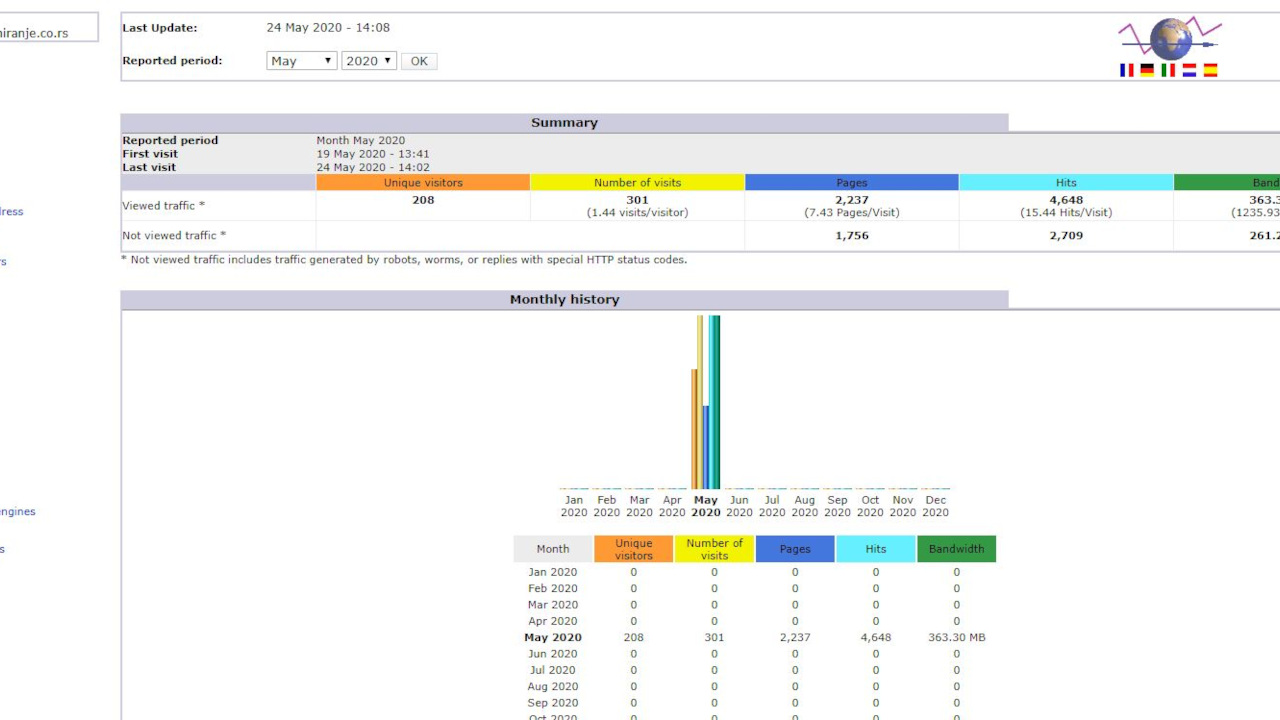
Website statistics are like a car's dashboard: you do not have to watch it all the time, but if you never look at it, you only find out something is wrong when the car stops. A few minutes a month is enough to see what people are looking for on your site, what they find and where they give up.
Where is AWStats and where does its data come from?
In cPanel, AWStats is in the Metrics section, under the name Awstats. Open it, choose your domain and click the view icon. If you are still looking for hosting for your first website, see also where you can find free web hosting.
AWStats does not add any code to your pages. It reads the server's access log, where the server records every request: every page, image and file someone downloaded. Three things follow from that:
- It sees visitors other tools miss: it counts visitors who block JavaScript, cookies or ads anyway, because the server records every request. That is also why it needs no cookie notice.
- It cannot always tell people from robots: it recognizes known search engines, but new robots may show up as ordinary visitors.
- It does not update instantly: on most hosting plans statistics are processed once or a few times a day, so you may see today's visits only tomorrow.
What is the difference between visitors, visits, pages and hits?
At the top of the report AWStats shows five numbers. They are often confused, yet they mean quite different things.
Unique visitors
AWStats does not know who you are, only which IP address you came from. A unique visitor is therefore one IP address in the selected period. If you open the site from the same laptop 30 times in a month, you count as one visitor. If you open it at work and then in the evening from your phone at home, you count as two.
The reverse is also true: a whole office that connects to the internet through one line may appear as one visitor, and a phone whose mobile operator changes its IP address may appear as several. That is why this number is an estimate, not an exact count of people.
Number of visits
A visit is a series of pages viewed by the same visitor without a break longer than one hour. If you view 18 pages in a row, that is one visit. If you come back after 20 minutes, it is still the same visit; if you come back after two hours, it is a new one.
Pages
The number of pages viewed. AWStats does not count images, stylesheets (CSS), JavaScript files and similar supporting files as pages, only what the visitor actually sees as a page. The ratio of pages to visits tells you how many pages people view per visit on average.
Hits
A hit is any request to the server, for any file. A page with 20 images, one CSS file and two JavaScript files produces 24 hits, while the visitor saw one page. That is why hits are always far higher than pages and mean little on their own. When someone says a site gets “thousands of hits a day”, ask them how many visits it gets.
Bandwidth
How much data the server sent to visitors. It matters if your hosting plan limits monthly traffic. A sudden jump in bandwidth usually means oversized images or videos were added to the site, or that a robot is downloading the whole site.
| Metric | What it counts | When it is useful |
|---|---|---|
| Unique visitors | Different IP addresses | A rough estimate of how many people come |
| Visits | Series of pages without a break longer than an hour | The best metric for comparing months |
| Pages | Pages viewed | How much content people read |
| Hits | All requests, including images and files | Server load |
| Bandwidth | Amount of data sent | Hosting plan limits, oversized images |
Viewed and not viewed traffic
AWStats splits traffic into viewed traffic, generated by people, and not viewed traffic, generated by robots, search engines and requests that ended in an error. Do not be surprised if there is more not viewed traffic than viewed traffic. That is normal today.
In the Robots/Spiders visitors section you can see which robots come by: Googlebot, Bingbot and other search engines, and nowadays also robots that collect texts for artificial intelligence. If Googlebot visits regularly, that is a good sign: Google is following your site.
How long do visitors stay?
The Visits duration section groups visits by length: up to 30 seconds, from 30 seconds to 2 minutes and so on, up to visits longer than an hour. Longer visits usually mean people found something that interests them.
There is a catch here. AWStats measures the time from the first to the last page of a visit, because it has no other way of knowing when you closed the browser. If someone opens one page and reads it for ten minutes, AWStats records a visit of 0 to 30 seconds. So many short visits do not necessarily mean the content is poor. On a page with a phone number, a short visit is a success: the visitor found the number and called.
If short visits are frequent on long articles that are supposed to lead further, check whether the page answers what people came for and whether it has links to the next step.
Which pages do people view, where do they enter and where do they leave?
The Pages-URL section lists the most viewed pages, and for each one how many times it was an entry page and an exit page.
- The most viewed pages show what interests people most. They are good places for links to other pages, contact details and important information, because that is where most people will see them.
- Entry pages are the first pages a visitor opens. This one is important! People rarely enter through the home page. Most often they land directly on an article they found in search. On this site, for example, one of the pages Google shows most often in search is The 20 Most Popular Programming Languages. For many visitors that is their first impression of the whole site, so entry pages should be among the best-kept ones.
- Exit pages are the last pages before leaving. Leaving is not always a bad sign: if people leave from the contact page, they probably found what they were looking for. If many people leave from a page that should lead them further, such as a product description, it is worth checking why.
Which devices and browsers do visitors use?
The Operating Systems and Browsers sections show what people use to view your site. Today that is mostly Chrome, Safari (on iPhone and Mac), Edge and Firefox, and on many websites more than half of all visits come from phones.
Websites used to be specially adjusted for Internet Explorer, which did not follow standards. Microsoft retired it in 2022, and today's browsers follow the standards, so separate versions of a site for each browser are no longer needed. What you should watch out for are screens: if you see a lot of Android and iOS in the operating systems list, open your site on a phone and check that it is easy to read and that buttons are easy to tap. How a website is planned and built for all devices is covered in the guide to web development.
Where do visitors come from?
The Connect to site from section groups visitors by how they arrived:
- Direct address / Bookmark: they typed the address, opened it from a bookmark, or from an app that does not pass on where the link was (email, Viber, WhatsApp).
- Links from an Internet Search Engine: they came from search (Google, Bing and others).
- Links from an external page: they clicked a link on another website.
The list of external sites is interesting because it shows who mentions you. If you recognize a good site, look at the context in which it linked to you. Such links also help search engine optimization, and sometimes they are the start of a collaboration.
One warning: do not click every unknown site on that list. Some of them are “referral spam”, fake entries planted by robots so that you open their site out of curiosity, and those sites are often suspicious or malicious.
Why are keyphrases in AWStats almost empty?
The Search Keyphrases section used to show which words people typed into a search engine before coming to the site. It was one of the most useful reports. Today it is almost empty, because Google and other search engines work over an encrypted connection (HTTPS) and no longer pass on what the visitor searched for.
That is what the free Google Search Console is for today. It shows which searches your site appears for, how many times, how many people click and in which position you are.
Which pages are broken?
The HTTP Status codes section shows how many requests ended in an error. The most useful part is the Pages not found list (error 404): addresses that people or robots request, but which do not exist on the site.
- If the list contains a page that used to exist, set up a redirect to the new address, so visitors from old links do not land on an empty page.
- If it contains an address with a typo, find where on the site the wrong link is and fix it.
- If you see addresses such as
wp-login.phpor.envand your site is not on WordPress, those are robots looking for weak spots. It happens every day, and you do not need to do anything except keep your site and plugins up to date.
AWStats, Google Analytics or Google Search Console?
These three tools do not measure the same thing, so their numbers are never equal. It is best to use them together, each for what it does well.
| Tool | Where the data comes from | Good for | Limitations |
|---|---|---|---|
| AWStats | Server log | All requests, robots, 404 errors, bandwidth | Visitors are an IP-based estimate, no keyphrases, up to a day's delay |
| Google Analytics | Code on the pages | Visitor behaviour, traffic sources, devices, goals (e.g. an inquiry sent) | Requires a cookie notice, misses visitors who block tracking |
| Google Search Console | Google's own data | Searches, impressions, clicks, position, indexing problems | Sees only Google search, not visits from other sources |
How to follow your statistics regularly
- Once a month, set aside ten minutes to look at visits, the most viewed and entry pages, sources and 404 errors.
- Compare with the same month last year, not only with the previous month. Many businesses are seasonal, so a drop in August may mean nothing bad.
- Write down a few numbers in a table. AWStats keeps history, but trends are easier to see when the numbers are one below the other.
- After every major change to the site, a new article or a campaign, check whether anything changed.
The most important thing is to look at your statistics regularly. You will learn more about how people use your site, what works well and what needs fixing, and you will start seeing your site as a tool that brings in business rather than just a brochure on the internet. Now open cPanel and take a look at your statistics!
This article was inspired by Rod Clayton's “Understanding AWStats” (cyberscribeweb.com), rewritten and updated for today.
Statistics show too few visits?
The numbers tell you there is a problem, and a website review shows why: which pages do not appear in search, what drives visitors away and what exactly needs to change.
Leave a Comment